



工作中遇到一个需求:将多份 Office Word 文档按指定顺序合并,再统一转为 HTML5 格式。
具体需要解决以下三个问题:
- 按照给定的 Excel 列表,将多个 Word 文档按顺序合并
- 合并后保留原文档的字体和样式,并将文档中的图片转为 Base64 内嵌
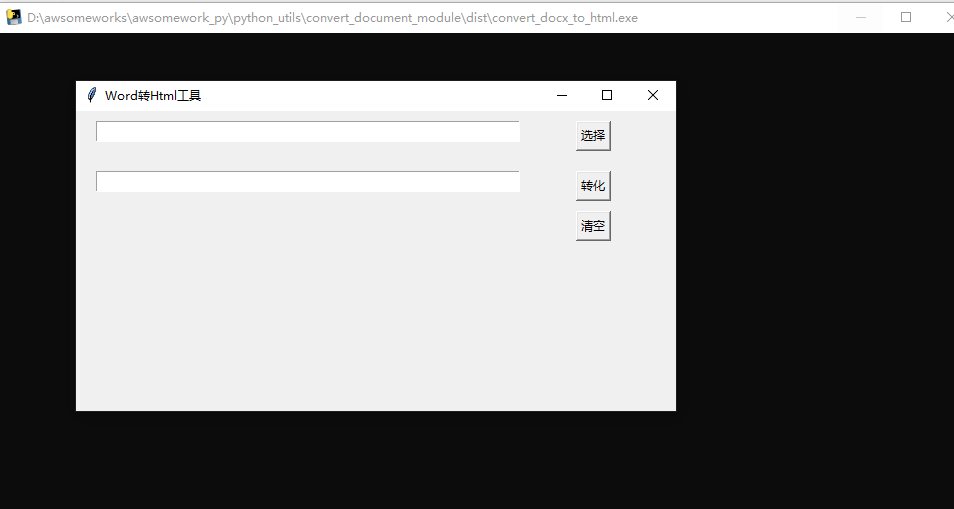
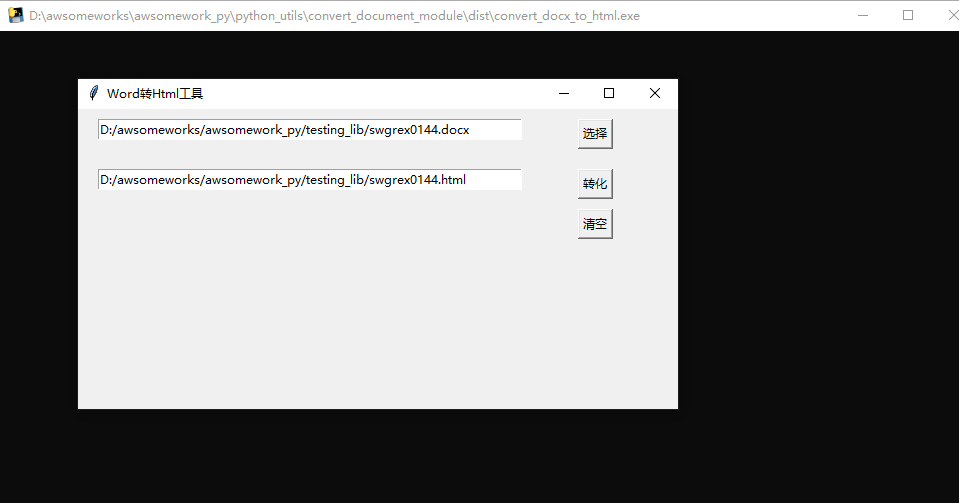
- 将整套流程封装为简单的 GUI 程序,方便资源组直接使用
工具清单
| Tool | 说明 | Link |
|---|---|---|
| python=3.7 | 基础语言 | https://docs.python.org/3.7/ |
| base64 | 图片 Base64 转码 | https://docs.python.org/3.7/library/base64.html?highlight=base64#module-base64 |
| tkinter | Python GUI 框架 | https://docs.python.org/3.7/library/tkinter.html?highlight=tkinter#module-tkinter |
| docx=0.2.4 | 加载 Word 文档 | https://pypi.org/project/docx/ |
| docxcompose=1.3.4 | 合并操作 Word 文档 | https://pypi.org/project/docxcompose/ |
| pywin32=304 | 调用 Office 宏的 Python 包 | https://pypi.org/project/pywin32/ |
| lxml=4.9.0 | 解析 HTML | https://pypi.org/project/lxml/ |
#! /usr/bin/env python3
# -*- coding: utf-8 -*-
# 将 docx 转化为 html

import os
import base64
import shutil
import tkinter as tk
from tkinter import filedialog
from lxml import etree
from win32com import client as wc
from docx import Document
from docxcompose.composer import Composer
代码清单
合并 Word 文档(主要针对 docx)
def merge_doc(docx_list: list, docx_tar: str, docx_list_src: str):
    """
    docx_list: word 文档名称列表,如 ["word1.docx", "word2.docx"]
    docx_tar: 合并后 word 文档的存储目标目录
    docx_list_src: 待合并 word 文档的源文件目录
    """
    if len(docx_list) == 0:
        return
    # 以第一个 word 文档作为合并基文档
    base_docx = os.path.join(docx_list_src, docx_list[0])
    tar_doc = Document(base_docx)
    tar_composer = Composer(tar_doc)
    # 依次追加后续文档
    for next_doc in docx_list[1:]:
        next_doc_path = os.path.join(docx_list_src, next_doc)
        tar_composer.append(Document(next_doc_path))
    # 保存合并后的文档
    docx_tar_file = os.path.join(docx_tar, "introduce.docx")
    tar_composer.save(docx_tar_file)
Word 文档转 Html
def convert_docx_html_pywin(docx_file_path: str) -> str:
    """
    docx_file_path: word 原文档路径
    """
    # 调用 Windows Word 的 COM 宏
    word = wc.Dispatch('Word.Application')
    doc = word.Documents.Open(docx_file_path)
    html_file_path = os.path.join(os.path.dirname(docx_file_path),
                                  os.path.basename(docx_file_path).split(".")[0] + ".html")
    # 另存为 Html(格式代码 10)
    doc.SaveAs(html_file_path, 10)
    doc.Close()
    word.Quit()

    # 编码转换:GBK → UTF-8
    fp = open(html_file_path, "rb")
    html_gb = fp.read()
    fp.close()
    fp = open(html_file_path, "wb")
    fp.write(html_gb.decode("gbk").replace("charset=gb2312", "charset=utf-8").encode("utf-8"))
    fp.close()
    return html_file_path
图片转 Base64 编码
def convert_pic_base64(img_path: str) -> str:
    """
    img_path: 图片路径
    return: Base64 编码串
    """
    fp = open(img_path, "rb")
    img_content = fp.read()
    img_base64 = base64.b64encode(img_content)

    img_base64_str = str(img_base64, "utf-8")  # bytes 转 utf-8 字符串
    img_base64_tmp = f"data:image/{os.path.splitext(img_path)[-1][1:]};base64,{img_base64_str}"
    return img_base64_tmp
替换 Html 中的图片为 Base64
def process_html_img_tag(html_tar_file: str):
    """
    html_tar_file: word 转存 html 的原始文件路径
    """
    # 当前转化图片所在目录
    dir_path = os.path.dirname(html_tar_file)
    # 解析 html 并替换 img 标签的 src
    html_content = etree.parse(html_tar_file, etree.HTMLParser())
    tmp_files = []
    for img_tag in html_content.xpath("//img"):
        if img_tag.attrib["src"] == "":
            continue
        src_img_path = os.path.join(dir_path, img_tag.attrib["src"])
        tmp_files.append(os.path.dirname(src_img_path))
        src_img_b64code = convert_pic_base64(src_img_path)
        img_tag.attrib["src"] = src_img_b64code

    # 去除转换后 html 中的 system URL 和 public ID
    html_content.docinfo.system_url = None
    html_content.docinfo.public_id = None
    # 将 lxml 处理后的字节内容写入 utf-8 html 文件
    f = open(html_tar_file, "w", encoding="utf-8")
    # method=html 去除冗余信息
    f.write(etree.tostring(html_content, encoding="utf-8", method="html", pretty_print=True).decode("utf-8"))
    f.close()

    for p in tmp_files:
        shutil.rmtree(p)


# Word 转 Html 总成
def convert(docx_path: str):
    html_path = convert_docx_html_pywin(docx_path)
    process_html_img_tag(html_path)
    return html_path.replace("\\", "/")
基于 tkinter 的 GUI 设计
window = tk.Tk()
window.title("Word转Html工具")
window.geometry('600x300')

# 输入框 1:源文件路径
path_var = tk.StringVar()
entry = tk.Entry(window, textvariable=path_var, width=60)
entry.place(x=20, y=10, anchor='nw')

# 输入框 2:转换结果路径
path_var1 = tk.StringVar()
entry1 = tk.Entry(window, textvariable=path_var1, width=60)
entry1.place(x=20, y=60, anchor='nw')


def choose_file_click():
    """选择文件事件"""
    file_types = [("word文件", "*.docx")]
    file_name = filedialog.askopenfilename(title='选择单个文件',
                                           filetypes=file_types,
                                           initialdir='./')
    path_var.set(file_name)


def convert_file_click():
    """Word 转 Html 事件"""
    src_file_path = path_var.get()
    convert_file_path = convert(src_file_path)
    path_var1.set(convert_file_path)


def clear_click():
    """清空所有输入"""
    path_var.set("")
    path_var1.set("")


choose_btn = tk.Button(window, text='选择', command=choose_file_click)
choose_btn.place(x=450, y=10, anchor='nw')
convert_btn = tk.Button(window, text='转化', command=convert_file_click)
convert_btn.place(x=450, y=60, anchor='nw')
clear_btn = tk.Button(window, text='清空', command=clear_click)
clear_btn.place(x=450, y=100, anchor='nw')

window.mainloop()
Word 合并及转 Html 测试
合并效果
if __name__ == '__main__':
    docs = ["xx.docx", "yy.docx"]
    tar = r""
    src = r""
    merge_doc(docs, tar, src)
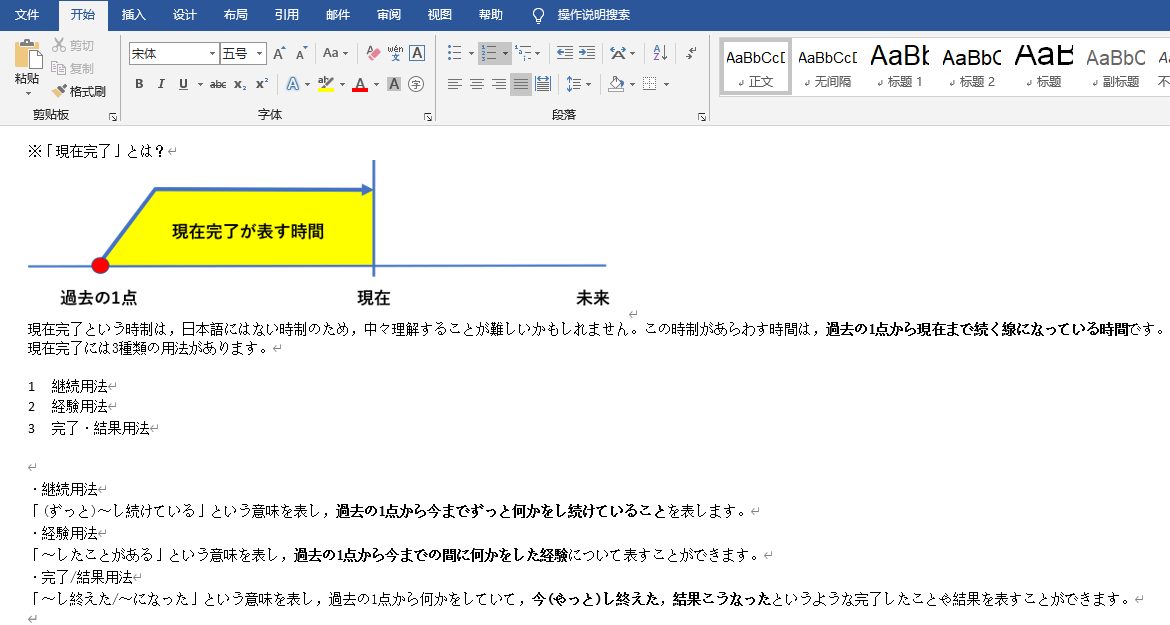
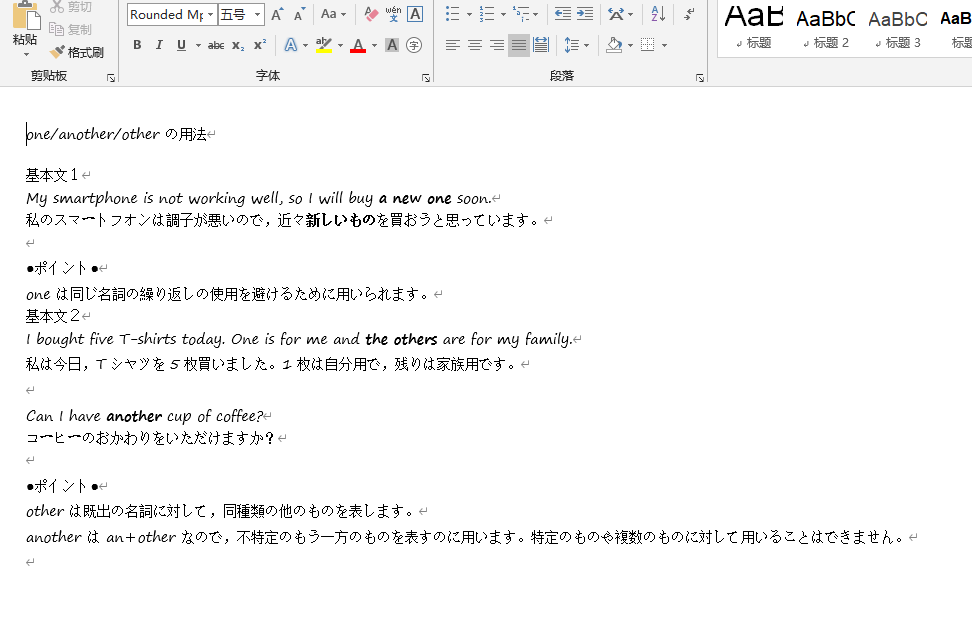
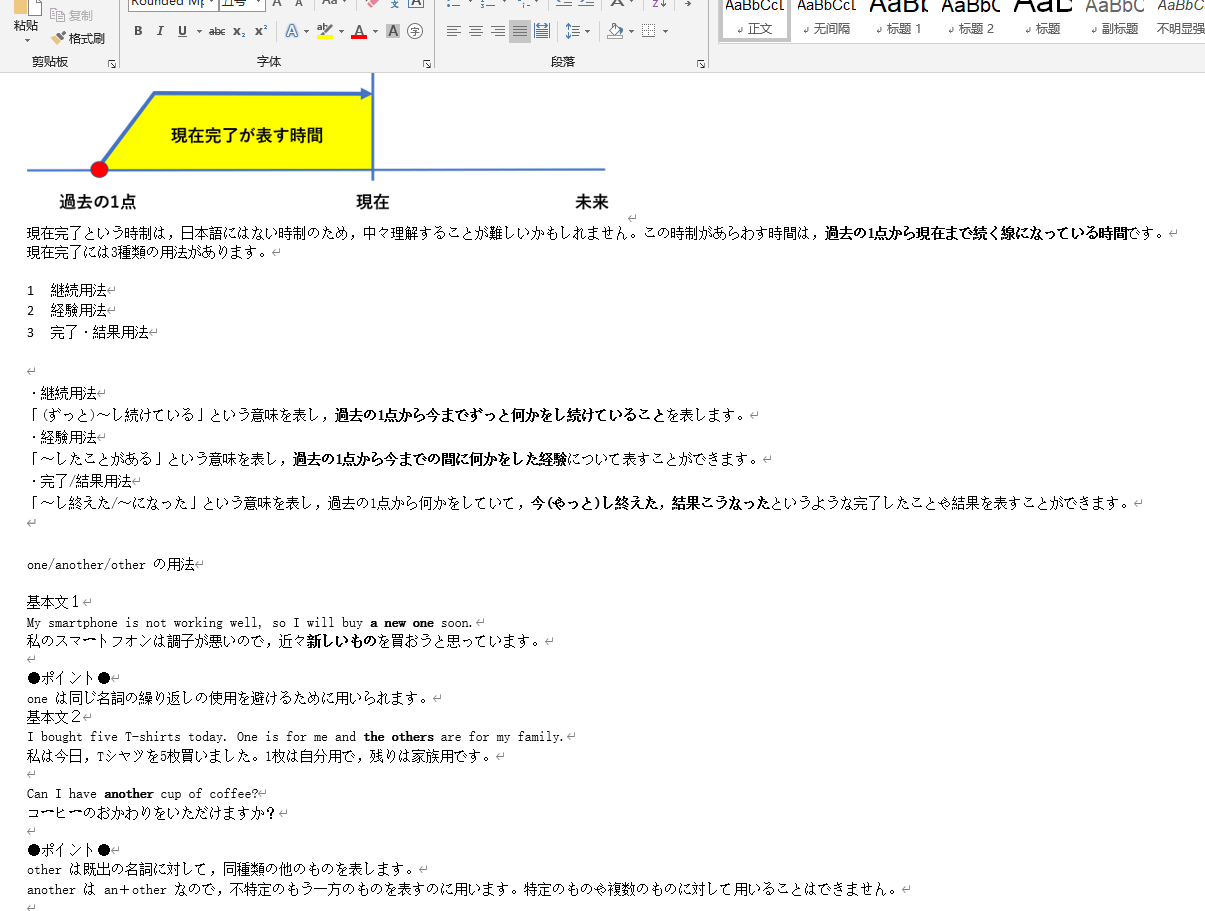
注意: 合并效果中
/docx 2/的字体样式存在部分合并失效的情况,目前未有很好的解决方法。如果您有好的建议,欢迎留言,不胜感激!
Docx 转 Html 效果
转化后的 Html 文件:
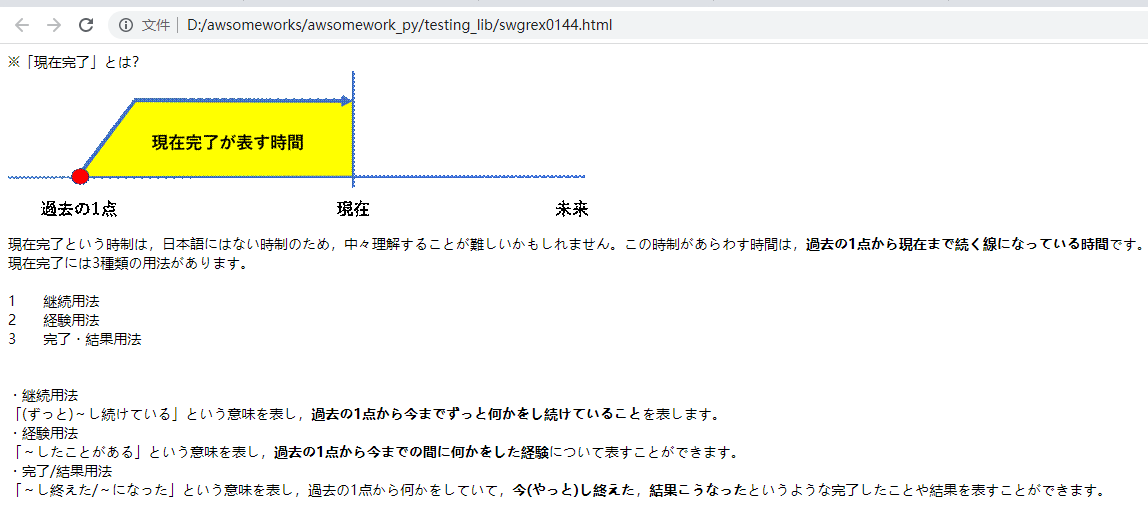
<p class="MsoNormal" style="text-align:justify;text-justify:inter-ideograph;line-height:normal">
    <span style='font-size:10.5pt;font-family:"Rounded Mplus 1c"'>
        <img width="601" height="159" id="image1.png" src="data:image/gif;base64,R0lGODlhWQKfAHcAMSH...+GcAQEAOw==">
    </span>
</p>
GUI 效果及测试